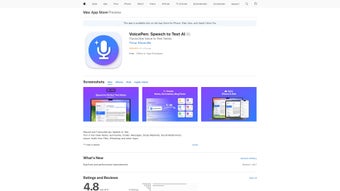

Download VoicePen App – AI Speech‑to‑Text, Fast Transcription, Secure Cloud
Why VoicePen App Is the Go‑to Transcription Tool for Professionals
In today’s fast‑paced digital world, converting spoken words into written text quickly and accurately is no longer a luxury—it’s a necessity. VoicePen App answers that call with a sleek, web‑based AI voice generator that turns any audio input into clear, editable text. Whether you’re a journalist needing interview notes, a student recording lectures, a podcaster editing scripts, or a corporate team documenting meetings, VoicePen streamlines the transcription process while keeping data secure.
Built on cutting‑edge natural language processing, the service offers near‑real‑time conversion, high accuracy across multiple accents, and a user‑friendly interface that reduces the learning curve to minutes. The subscription model unlocks advanced capabilities such as custom vocabularies, bulk uploads, and priority processing, making it an essential addition to any productivity toolkit. Moreover, VoicePen’s cross‑platform design ensures that whether you’re on an iPhone, iPad, or MacBook, your transcriptions are just a click away, synced effortlessly through the cloud.
This overview will walk you through the app’s standout features, installation steps, device compatibility, pricing, and the pros and cons that matter most to potential users.
Key Features That Set VoicePen Apart
- Real‑time speech‑to‑text conversion with latency under two seconds.
- Support for 30+ languages and dialects, including regional accents.
- Automatic punctuation and formatting for ready‑to‑publish text.
- Custom vocabulary builder for industry‑specific terminology.
- Bulk audio file upload (MP3, WAV, AAC) with batch processing.
- Secure end‑to‑end encryption for all uploaded recordings.
- Cloud sync across iOS and macOS devices for seamless access.
- Export options: TXT, DOCX, PDF, and direct copy‑to‑clipboard.
- AI‑enhanced noise reduction to improve accuracy on low‑quality recordings.
- Subscription tier with priority processing and higher transcription minutes.
Each of these capabilities is designed to reduce the friction that typically accompanies manual transcription. For instance, the automatic punctuation feature saves users hours of editing time, while the custom vocabulary ensures that technical terms—like “blockchain” or “CRISPR”—are captured correctly. Security‑focused professionals will appreciate the end‑to‑end encryption, which guarantees that sensitive business meetings or confidential interviews stay private. The export flexibility means you can drop the output straight into your favorite word processor or content management system without additional conversion steps. Altogether, VoicePen’s feature set creates a powerful, all‑in‑one environment for anyone who regularly works with spoken content.
Installation & Usage: From Download to Daily Workflow
Step‑by‑Step Installation
- Visit the official VoicePen website and click the “Download for iOS” or “Download for macOS” button.
- For iOS, the App Store will open; tap “Get” and authenticate with Face ID, Touch ID, or your Apple ID password.
- For macOS, a .dmg file downloads; open it, drag the VoicePen icon into your Applications folder, and launch the app.
- Sign up with an email address or use Apple Sign‑In for instant account creation.
- Choose a subscription plan that matches your transcription volume needs; a 7‑day free trial is available for first‑time users.
Typical Daily Workflow
Once installed, the workflow is intentionally straightforward. Open VoicePen and press the large “Record” button to capture live speech, or tap “Upload” to select a pre‑recorded file. The AI begins processing instantly, displaying the transcribed text in a split‑screen view.
You can pause, edit, or add timestamps as needed. When the transcription is complete, use the export menu to save the document in your preferred format or share it directly to cloud storage services such as iCloud, Dropbox, or Google Drive. The app also offers a “Favorites” folder for frequently used custom vocabularies, enabling you to switch contexts (e.g., medical vs. legal) with a single tap.
Because the platform is web‑based, any changes you make sync across all devices, ensuring you always have the latest version at hand.
For power users, the web dashboard provides analytics on transcription speed, accuracy percentages, and usage history, allowing you to monitor subscription limits and plan upgrades. The intuitive design means that even first‑time users can become proficient within a few minutes, while seasoned professionals will appreciate the depth of customization available.
Compatibility, Pricing, and What You Get With a Subscription
VoicePen App is fully compatible with iOS 14 or later and macOS 12 or later. The web version works in all modern browsers (Chrome, Safari, Edge, Firefox) and automatically adapts to mobile screens, providing a consistent experience on iPhone, iPad, and MacBook.
Pricing Tiers
- Free Trial: 30 minutes of transcription, no credit card required.
- Basic Plan: $9.99 / month for 500 minutes, standard processing speed.
- Pro Plan: $24.99 / month for 2,000 minutes, priority queue, custom vocabularies.
- Enterprise: Custom pricing for unlimited minutes, dedicated account manager, SLA guarantees.
All paid tiers include cloud storage for your transcriptions, end‑to‑end encryption, and regular AI model updates that improve accuracy over time. The subscription is auto‑renewable but can be cancelled at any point via the account settings. VoicePen also offers volume discounts for educational institutions and non‑profits, making it a flexible solution for a wide range of users.
Because the service runs on Apple’s ecosystem, you benefit from native integration with Siri shortcuts, enabling voice‑activated transcription start commands. The app also supports macOS Touch Bar shortcuts for quick access during editing sessions, further enhancing productivity for power users.
Pros & Cons, Frequently Asked Questions, and Our Verdict
Pros
- Fast, near‑real‑time transcription with high accuracy.
- Broad language support and custom vocabulary options.
- Secure cloud storage and end‑to‑end encryption.
- Seamless sync across iOS and macOS devices.
- Flexible pricing with a generous free trial.
Cons
- Limited to Apple ecosystem; no native Windows or Android app.
- Higher‑tier plans can become costly for heavy users.
- Bulk processing speed depends on server load during peak times.
FAQ – VoicePen App
Can I use VoicePen on a Windows PC?
VoicePen does not offer a native Windows client, but you can access the web version through any modern browser on a Windows PC.
How secure is my audio data?
All recordings are encrypted in transit with TLS 1.3 and stored using end‑to‑end encryption, ensuring that only you can access your data.
Does VoicePen support offline transcription?
No, the AI processing runs on cloud servers, so an internet connection is required for transcription.
Can I import my own custom dictionary?
Yes, the Pro and Enterprise plans let you upload custom word lists to improve accuracy for specialized terminology.
What happens if I exceed my monthly minutes?
Transcriptions will pause until the next billing cycle or you purchase an add‑on package of extra minutes.
Our Verdict
VoicePen App delivers a compelling blend of speed, accuracy, and security that makes it a standout choice for anyone who regularly converts speech to text. Its tight integration with iOS and macOS ensures a smooth experience for Apple users, while the web interface keeps the service accessible on other platforms. Although the lack of a native Windows or Android app may limit some users, the overall value—especially with the free trial and robust feature set—justifies the subscription cost for professionals, students, and content creators alike. If you need reliable transcription without the hassle of manual typing, VoicePen is definitely worth a try.
Ready to boost your productivity? Download VoicePen App now and start your free trial today!



.png)



